On this page, I’m just going to outline my basic computer set-up, both hardware and software, that I’m using right now. I’ve also put in a bit about previous computers I’ve owned. I hope this is at best a little interesting, and at worst, not a waste of time.
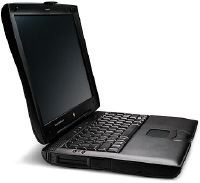
Computer model
Apple Macintosh Powerbook G3, aka “Wall Street”;
- 14"TFT screen, Millions of colours at 1024 by 768
- 233MHz G3 Motorola chip
- 2Gb Hard drive
- 32 Mb RAM
Built in:
- Apple ADB
- SVGA out
- 56K modem
- 10Mbit Ethernet
- SCSI
- PCMCIA
- 20 speed CDROM (hot swappable)
Additional Hardware:
- Epson Stylus Color 600 Colour printer
- Iomega 100Mb SCSI Zip drive
- Mouse
- Pace NB 56K Fax/Modem PCMCIA (spare)
Software:
- MacOS 8.5
- Japanese Language Kit 1.2
- ClarisWorks Office 5
- Netscape Navigator 4.08
- Internet Explorer 4.5
- BBedit 4.5.3
- Adobe Photoshop 3.0.5
- Graphic Converter 3.5.1
- MacLink Plus
- Musashi 3.0.5 e-mail
- Transmit 1.2
- FreePPP 2.6.2
- Disk Surveyor
- Default Folder
- Sokoban game
Many of the above are shareware and/or freeware.
Graham’s PC
As well as my Mac, I also have a Wintel desktop machine in the UK, which is currently living at my parent’s house. Here’s a brief rundown on what it’s like, but before I do, please remember that I bought it in the summer of 1994, when I was a poor engineering student, though I added a few extras to it. Hardware:
- Intel i486DX2/66
- 40Mb RAM
- 280Mb Hard Disk
- 1Mb Cirrus Logic Video Card
- 14" Smile monitor
- Epson Stylus 800+ Mono printer
- SupraExpress 56K modem
Software:
- Windows 95 (USB build)
- Turnpike Internet access/mail software
- Netscape Navigator 4.05
- ClarisWorks Office 5
I also have an older Mac laptop, which used to be my main machine; here’s the spec…
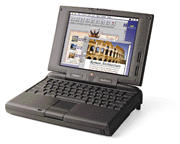
Apple Macintosh Powerbook 190cs (Japanese model)
- DSTN screen, 256 colours
- 66MHz Motorola 68LC040
- 515Mb IDE Hard Disk
- 40Mb RAM (Upgraded May ‘98)
Additional Hardware:
- External/Portable 4x speed SCSI CD-ROM
- Epson Stylus Color 600 Colour printer
- Iomega 100Mb SCSI Zip drive
- Mouse
- Pace NB 56K Fax/Modem
Software:
- MacOS 8.1
- Japanese Language Kit 1.2
- ClarisWorks Office 5
- Netscape Navigator 4.08 *
- Internet Explorer 4.01 *
- BBedit 4.5.3
- Adobe Photoshop 3.0.5
- Graphic Converter 3.4 *
- MacLink Plus
- Musashi 2.2.2 e-mail *
- Transit 1.1 *
- FreePPP 2.6.2 *
- Disk Surveyor *
- Default Folder *
- Sokoban game *
- indicates shareware and/or freeware.
Basic Philosophy
Software Most software is overpriced and/or bloatware, which is only bought for the sake of compatibility (say hello to translators and neutral file formats you people!) or show, and only use 10% of the features (the other 90% are thus wasted and just using resources). Some of the best software still comes from small companies and often is shareware. A note here - if you use shareware PLEASE pay the fee, these people deserve it!!
Hardware Most people buy computers which have far more power than they will ever use, and thus have probably wasted their money, no matter how good it looks. Research what you’re going to buy, and buy for what you need now and for the foreseeable future.
Summary Yes, I like to keep it cheap, mainly because I like to spend my time and money on going out and partying too! To be honest you can keep it cheap and still achieve great results - certainly, I can do more than many people with setups costing many times more than mine! Sometimes though the setup does need upgrading, but upgrade as needed!